Combobox will be used when DataGrid would like provide multi options(datatype is enum) to select in datagrid column.
There is two way to implement (1) DataGridComboBoxColumn (2) DataGridTemplateColumn.
In fact there are 4 basic dataGridColumn supported on DataGrid(1)DataGridComboBoxColumn – display enum data (2)DataGridHyperlinkColumn-display url data (3)DataGridCheckBoxColumn – display boolean data (4) DataGridTextColumn -display text data.
If we want to use other controls in your DataGrid, we can create our own column types by using DataGridTemplateColumn. So there are basic two solution for ComBobox support in datagrid .
if we use DataGridComboBoxColumn, we need set the ItemsSource property for the ComboBox.
Once the ItemsSource is set, bind the selected item in the ComboBox to the data item for the row that the cell is in. we can set the binding by using
| TextBinding | Sets the binding path of the text for the currently selected item. |
| SelectedItemBinding | Sets the binding path of the object that is currently selected. |
| SelectedValueBinding | Sets the binding path to the value of the selected item specified by the SelectedValuePath property. |
<DataGridComboBoxColumn Header="Type" Width="120" ItemsSource="{Binding Source={StaticResource GameTypeEnum}}"
                                    SelectedItemBinding="{Binding Type}" ></DataGridComboBoxColumn>
if we want users cannot edit the column and will not be able to see the drop-down list. we can set property IsReadOnly = true.
Here we use Static Resource as Collection, In fact we also can use an inline collection of ComboBoxItem types. which we will show on second solution.
Second Solution is use DataGridTemplateColumn and Defind Combobox in DataTemplate. it enables us to create our own column types by specifying the cell templates to use when displaying and editing values.
To specify the template that is used to display the contents of a cell that is not in editing mode, set the CellTemplate property. To specify the template that is used to display the contents of a cell that is in editing mode, set the CellEditingTemplate property.
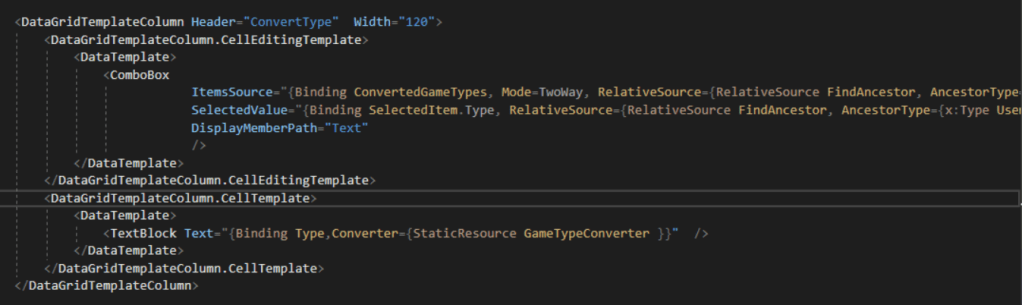
For cellTemplate , using TextBox to displaying the Item, For CellEditingTemplate, using ComboBox to display options and enable user to select. Here we need set ItemsSource,SeletedValue,DisplayMemberPath property ,which is same purpose as before.
There is one point I would like to share is that RelativeSource property , since Comboxbox ItemResource is totally different with Datagrid ItemResouce, This is why we need defined Relativesource to let Combobox find its reource, we will define Find Type of resource. Type maybe windows, usercontrol ,TextBox…
Thank you for your view.
 SunnyInNorway
Leave a comment