I have to delete some duplicate game data with different primary key. In other words,My application insert same game data many times in one table due to some software bug.
Now my purpose is to delete these duplicate game data but keep only one record for each same game data.
My table GameSale is defined as following.
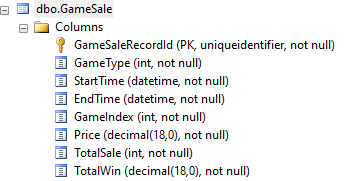
With Same game data, all the column are same Except Primary key “GameSaleRecordId”. My delete statement is used as following:
WITH gsd AS (
    SELECT
        GameType,
        GameIndex,
        TotalSale,
	Price,
        ROW_NUMBER() OVER (
            PARTITION BY
                GameIndex,
		Price,
                TotalSale
            ORDER BY
                GameIndex,
		Price,
                TotalSale
        ) row_num
     FROM
       GameSaleRecords where StartTime>'2022-04-28'
)
DELETE FROM gsd
WHERE row_num > 1;
Here we would like to address Select – over clause, This Query determines the partitioning and ordering of a rowset before the associated window function is applied.
More detailed about over clause ,refer to https://docs.microsoft.com/en-us/sql/t-sql/queries/select-over-clause-transact-sql?view=sql-server-ver15
Here are I would like to mention “window function”, which is different with aggregate function.
A window function performs a calculation across a set of table rows that are somehow related to the current row. This is comparable to the type of calculation that can be done with an aggregate function. But unlike regular aggregate functions, use of a window function does not cause rows to become grouped into a single output row — the rows retain their separate identities. Behind the scenes, the window function is able to access more than just the current row of the query result
In my case, I defined one PARTITION with same GameIndex,Price and TotalSale.If there is more rows meet this kind of condition, the query result with row_num >1 will be deleted and keep the record of which row_num =1.
Prrtition by is combind with OVER() and windows function to calculate aggregated values, this is very This is very similar to GROUP BY and aggregate functions, but with one important difference: when you use a PARTITION BY, the row-level details are preserved and not collapsed. That is, you still have the original row-level details as well as the aggregated values at your disposal.
 SunnyInNorway
Leave a comment